Actually, choose a proper watermarking program is not that easy as there are many watermarking software programs on the market today, how to choose a proper one is very important. Here are some tips can guide you how to choose a right one. Let’s take a quick look:
1, Straightforward Tool to Copyright Photos
A good watermarking program should work well on protecting photos. It enables you to add text, image/logo to your photos and can protect them from being stolen and misused.
2, Multiple Image Formats Are Supported
A good watermarking program should support all popular image formats. So users can watermark photos directly without converting photos to acceptable image formats.
3, Fast Speed and Good Quality
An excellent watermarking tool can help to watermark hundreds of photos in minutes and still preserve good quality.
4, Powerful Functions
Good watermark software will not only help to watermark photos, but let users do more with its rich editing functions, such as cropping , resizing, renaming, etc.
5, Easy-to-use Watermarking and Pretty Interface.
Well-organized and easy-to-use interface could make users get started in seconds. And, it can also save a lot of time for you.
6, Cheap Price
High quality stuff is not cheap, but I must say nothing is impossible. There are still so many good stuffs out there with reasonable price. One of them is Watermark Software. Keep reading to learn more about it.
Watermarking Software is a proper Windows photo watermarking program for most of users, and below is how to use this watermarking software to protect photo copyright.

Step 1, Start.
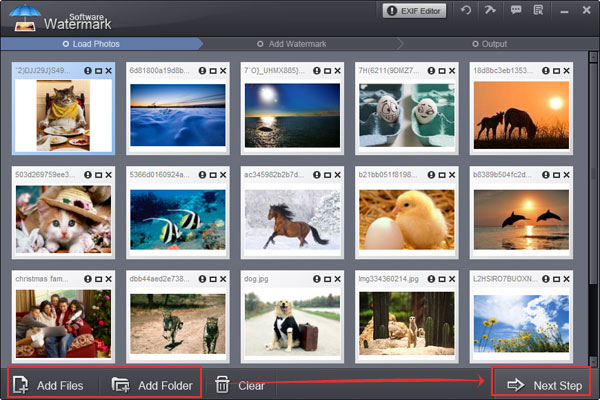
Click here to download Watermark Software and then launch it. Choose source photos which you want to add watermark. After photos have been loaded, click "Next Step" to go to watermark editing interface. Click “Text”/”Image” tab to add text watermark/image watermark.
Step 2, Add Image Watermark
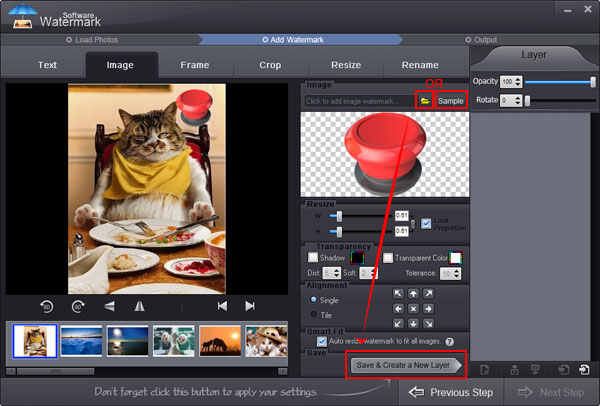
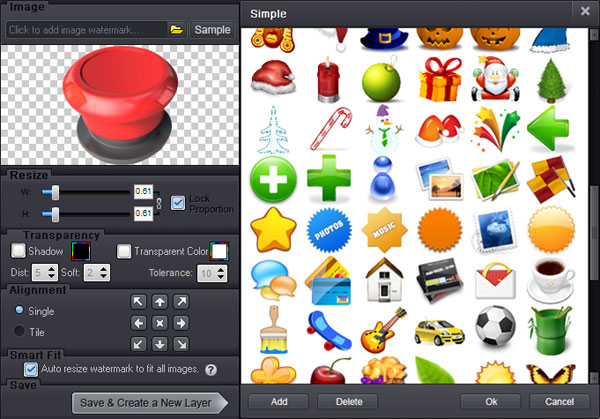
Click "Browse" to select existing image watermark or add new image from your hard disk.
Step 3, More Editing Options
The intuitive interface of Watermark Software will guide you how to customize watermarks easily with its rich editing options. On its editing panel, user can adjust aspect ratio of image watermark (Default: W=1, H=1), adjust opacity (0-100) and change the value of rotation (0-360). Specify "Single"/"Tile": “Single” is to place only one watermark on images while “Tile” is to repeat watermarks on images. (Tile is a strong protection mode). User can also drag watermark over the image to position it.
Step 4, Start Processing
On the output setting panel, specify output formats and output folder, and then click "Run" after all the settings are complete. The whole process will be OK in minutes.
Watermarking and protecting your photos is very easy, why not copyright your photos with this handy Watermark Software right now?
Still have trouble on watermarking software? Please Contact Us >> OR Learn more information about Watermark Software >
Watermark Software (photo edition) : This watermark tool provides professional image protecting solution for your online photos. The exclusive image processing technology lets you able to watermarking 500 photos within 1 minute.
Watermarking photos - Have you add watermarks to your photos before they are released online , because they are unsafe.
Best Free Watermark Software of 2014
Photo watermark software - protect your pictures with various effective watermarks
Add picture to GIF - with easy-to-use picture watermark software
Watermark on Wikipedia