Part 1. What is Picture Watermark
Part 2. How to Use Picture Watermark to Protect Picture Copyright
Picture watermark is almost the same as image watermark. They are both used to copyright photos and prevent people from copying and using your digital photos without your consent. A picture watermark is actually an image or a logo which could be inserted into pictures or photos. The symbolized image/text/logo can be designed at your will to make your pictures or photos unique. With copyright info on your photos, these photos can only belong to you. Others who want to use your photo commercially, they need to get your permission or even pay the money. Nowadays, it’s trendy to apply picture watermark to protect and personalize photos before upload online.

See the picture shown above, we embed an image watermark to it and it’s pretty difficult for others to remove. So protecting your image works is very easy by adding picture watermark with good picture watermark software, which can help to add picture watermark to your photos effortlessly.
You should first choose a professional watermark software program. If you have no ideas how to find a good one, I recommend you to try Watermark Software developed by watermark-software.com. It provides straightforward method to create different kinds of text watermark/ picture watermarks for your photo and can enable to add watermark to hundreds of pictures at one go. What’s more, more editing options are also available, such as cropping, resizing or renaming photos at once.


Click here to download this watermark software first, install it on your computer and then launch it. You need to import the picture that you want to add watermark to and then click "Next Step" button to Step 2.

Note: You are allowed to add different types of watermarks, such as text watermark or image watermark. Meanwhile adding a cool frame to make your photos more beautiful is also available.
Click “Image“ tab to begin to customize your own watermark. Place it wherever you want. Moreover, controlling the transparency of the image watermarks is available as well.
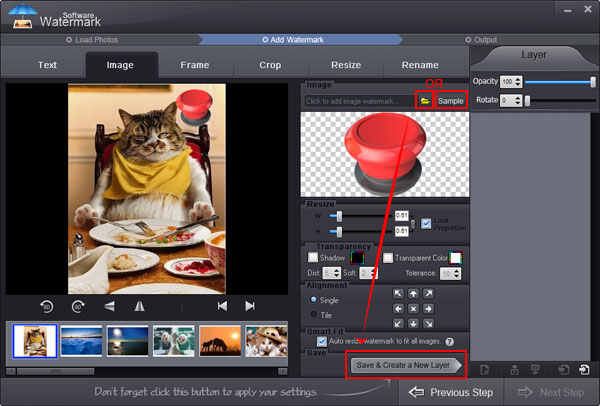
Note: With this program , you are able to add more than one image layer. That means, you can add different images on the same picture just like the picture above.
Besides, apart from the free watermark materials this watermark software provides, you can load watermarks to create your own fantastic watermark library.
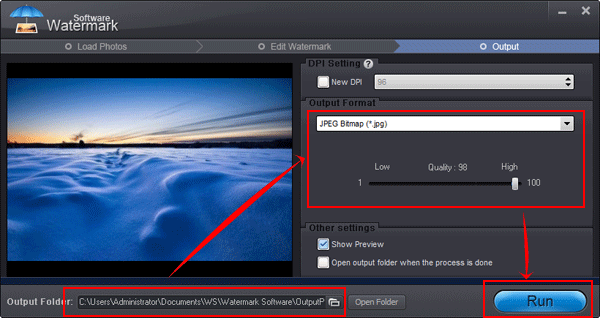
Press “Next Step” button. You’ll see another window. Here, you need to select an output folder. Moreover, this software also supports you to convert your photos to various pop formats, such as JPG, BMP, TGA, PCX, etc.
At last all you need to do is to hit “Run “button. Within minutes the whole process will be OK.
Watermarking pictures is very easy. Why not protect your image copyright with this tool right now?
Still have trouble on picture watermark? Please Contact Us >>
Watermark Software (photo edition) : This watermark tool provides professional image protecting solution for your online photos. The exclusive image processing technology lets you able to watermarking 500 photos within 1 minute.
Watermark Picture - with Image, Text, Logo and Signature
How to Add Text to Picture - with fast batch mode
How to Copyright Pictures - it's protected object what holder does not would like anybody use it without his permission.
How to Add Signature to Picture - actually there are mainly two types of text watermarks...
Most Popular Picture Sharing Websites for 2014 - find your favorite picture sharing website
The good rating picture watermark software on CNet