In most popular web browser(Firefox, Chrome, ie), every visitor can save images from web without any afford and some of them use these images as their own without authorization, because it so easy to do (open a web page > find a picture > right click > save picture as). But I have to say, this is an extremely unethical practice. So it’s really important to copyright our images and avoid unauthorized using, but what is the best method to do so? Although it’s difficult to 100% protect images, there is an effective way to discourage theft of images from website, which is to add copyright watermark to images.

There are two ways you can choose:
The first way is to edit all of your images to embed a watermark in your images before you upload them to your site. So that the only versions of the images on your site are the ones with the watermark embedded in them. If someone wants to get a copy of the image without the watermark, they must have to manually edit the image in their own graphics editor to attempt to remove the copyright information, but this is very difficult. They have to keep two copies of the image (one with and one without the notice), and you need to reapply the watermark every time you change the image.
Another way is to dynamically add the watermark to the images when they are viewed. Only one copy of the images is needed, but the processing is required to add it at each time when the image is displayed to plus the fact that the images without the copyright need to be on your site where there is at least the possibility that someone may find a way to access them directly. These disadvantages can be overcome by storing the original images in a password protected folder or above the root folder of your site and by setting up a caching system, so that a copy of the images with the copyright notice added are available for direct use with the script to add the copyright only needing to be run once for each image.
Let's keep things simple, Stephen Chapman's Dynamic Copyright Watermark is a little difficult for common people. But, undoubtedly, add watermark is also an effective way. So the next question goes that is there any tool can help to add copyrights to photos/images easily? Yes, Watermark Software is just the right tool offering a lot of copyrighted watermarks for you to copyright your photos.
With the help of this professional watermarking program – Watermark Software, we may easily add text watermark, image watermark, logo and even frames to photos to protect them. Now, let’s learn how to add text watermark with Watermark Software quickly:
1-1. Download Watermark Software Below:

1-2. Launch software and on its main interface, add your images by click "Add Files", you can also click "Add Folder" to add all of images in folder.
1-3. Go to next step.

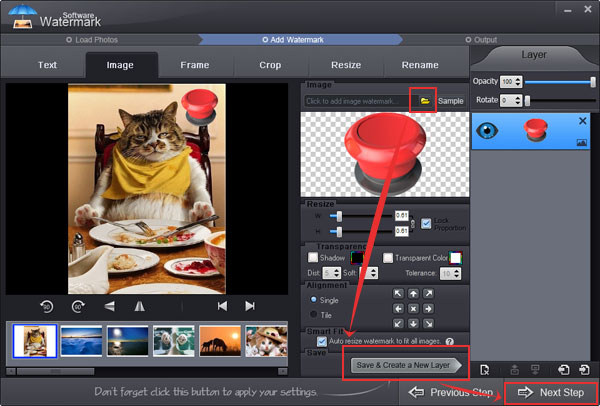
2-1. On the editing panel, click "Folder" icon to load your own watermark, or click "Browse" button to select an existing watermark image provided (there are over 100 free watermarks).
Note: You can also add text, add frame, crop image, batch resize, batch rename on this window if need.
2-2. Change some settings of your watermark such as "Opacity", "Rotate", "Tile", "Alignment". Then click "Save & Create a New Layer" button.
2-3. When all settings have been done, click "Next Step" button go to final step.
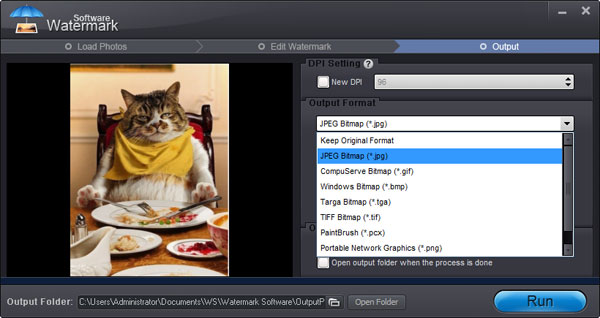
3-1. Choose an output folder to store watermarked photo.
2-2. Choose an output format, Watermark Software supports all popular image formats like JPG, GIF, BMP, PNG, TGA, TIF, PCX, ICO, etc.
2-3. Click "Run" button to start, this process will take about 10 seconds.
Watermark your photos is very easy, why not copyright your photos with Watermark Software right now?
Still have trouble on copyright watermark? Please contact us >>
Watermark Software (photo edition) : This watermark tool provides professional image protecting solution for your online photos. The exclusive image processing technology lets you able to watermarking 500 photos within 1 minute.
Protect Image Copyright - When You Upload Your Photo on Internet
How to copyright an image - use photo watermark to protect your photos’ copyright with the fastest speed
How to Copyright Pictures - This is protected object what holder does not would like anybody use it without his permission
Make a watermark - for your photo copyright
Best Free Watermark Software of 2014
A Great Watermark Creator for Photos
Copyright Office from U.S.