Do you want to make a watermark for your photos? Firstly, let us recognize what Watermark is. It is actually a special symbolized image, text or logo which could be embedded into picture or photo. The symbolized image/text/logo can be designed at your will for making your pictures or photos special. There are some forms of symbolized image such as opaque, transparent, or maybe company logo, personal features. A watermark tells the consumer who manufactured the photo, assuring a certain quality can protect your photos from illegal using, and it is also a great background for your photos.
Digital watermark is one of watermarks. When we make a watermark, we are accessing the process of possibly irreversibly embedding information into a digital signal. The signal may be text, pictures or images on some documents for protecting copyright or making special background effect, the watermark can be designed by users themselves. The text or image size, content and color or something else which can be adjusted is open for user. If the signal is copied, then the information is also carried in the copy. Amazing? Do you have any interest to make watermark on your photos or pictures right now?
Make a watermark on your documents, which can protect your photo's copyright, can make special effect for photo background, and even could make your thought turn on the watermark. So, if you have photos on the internet, you should make a watermark for them. Prevent your photos from unauthorized using, make your photos special, and tell the world your thought. I know you want to make a watermark right now, OK, let's do it.
First, pick a watermarking tool from the internet, search from Google, get top 1 item, Watermark Software is a good choice. The watermark could be an image, or maybe text words. Make a choice to make watermark with image or text. Each of the watermarks is very easy to make, and here I will share you the tutorial on watermarking image.
Step 1, Start.
Launch watermark software, choose the photo which you want to add image to and click "Next" to the editing window, and then click "add image" to image watermark interface.
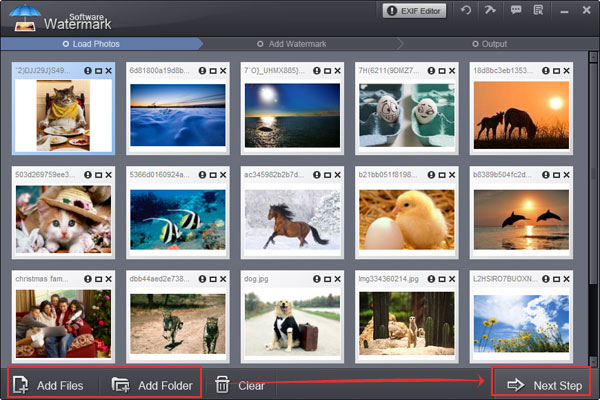
Step 2, Add files.
Select an existing image watermark or just upload a new image from your hard disk. Click "Browse" for selecting new images from hard disk.
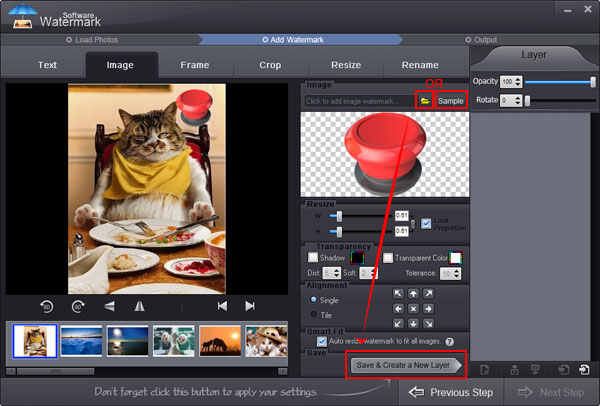
Step 3, Edit.
Watermark software's simple interface will tell you how to set here to adjust aspect ratio of image watermark (Default: W=1, H=1), selected lock box to binding width and height for your photo. You can adjust Opacity for your need (0-100) and adjust rotate for your need (0-360). You can choose "General" or "Tile" to place your text watermark on images, general is to place one text on images, tile is to fill full text on images. Tile is a strong copyright protecting mode, alignment setting to control text's azimuth on images.
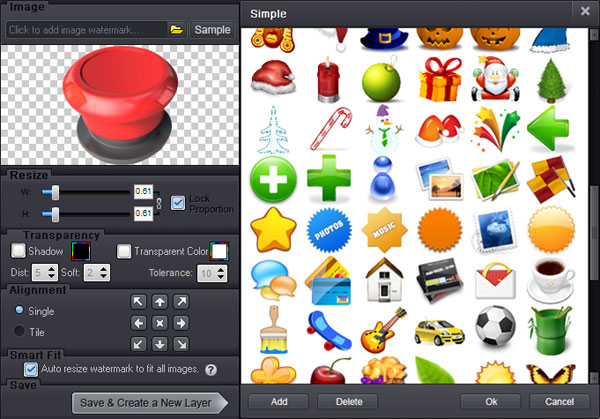
Step 4, Start the watermarking process
Click "Run" after finishing your editing. And the whole process will be finished perfectly in a very short time.
Now, everybody seeing the photo knows it belongs to you.
Still have trouble on making watermark? Please Contact Us >>
Watermark Software (photo edition) : This watermark tool provides professional image protecting solution for your online photos. The exclusive image processing technology lets you able to watermarking 500 photos within 1 minute.
Use Photo Watermark - to Protect Your Shared Photos
Add Watermark Graphics to Photos - to avoid unauthorized using
Create Watermark - to Your Photo with Watermark Software
Best Free Watermark Software of 2014
A Great Watermark Creator for Photos
Best ways to make GIF from YouTube - it’s so simple to make GIF from YouTube without size limit and quality loss.
How to make a watermark in word