Part 1: What is Photo Watermark
Part 2: Why We Need Put Watermark on Photo
Part 3: How to Put Watermark on Photo
Photo watermark is a recognizable image or pattern in photo that appears as various effects. It is a special mark, usually these marks are unique, and that is photo watermark which on behalf of the individual, groups or company's identity, and only that person who use it can use the mark, just like the signature, with strong representation. Photo watermark is widely used on internet photo, artwork and photograph, put watermark on photo often used for photo copyright protection. Put your particular watermark to some objects such as photos, so no one able use your photo without you approve.
Whether you are photographer or just like photograph.
Whether you are company art worker or just like artwork.
Whether you are designer or just like design.
Whether you are internet photo maker or just photo visitor.
Watermark is very important for you! Because if you upload your personal photos on your web, logo, flickr or any photo sharing website, so your photos may be jokes. If you sharing your artworks on internet just for sharing some techniques, so your photos may be stolen even some one put his watermark on your photos and claim these photos made from he. So you must add watermark now to protect your online or sharing photos safety.
The first you need install a photo watermark tool - Watermark Software
It is top 1 photo watermark software provides professional photo protection solutions with simple steps. Click below button to download Watermark software, after downloaded, please double click the installation icon to install to your PC.

Note: if you would like to add watermark to photo in batch, you can add many photos here.

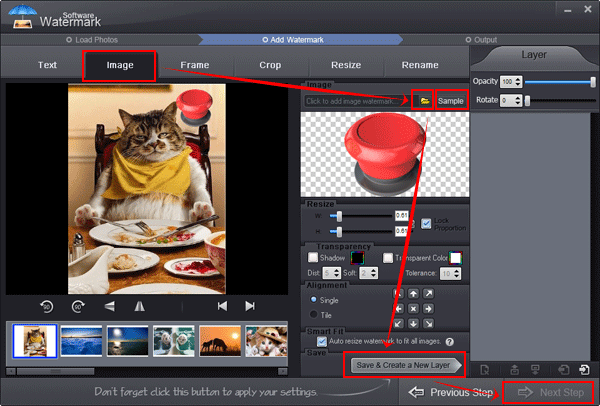
1) Click the tag to image watermark setting interface.
Note: with this window, you can also add text to picture, add frame, crop image, etc.
2) Click yellow "Folder" button to load your own watermark.
3) Or choose our free watermarks (100+)
4) Save all of settings and create a new <a href="/image-watermark.html">image watermark</a> layer.
5) With layer, you can export current project to keep all of settings.
6) Go to the last step
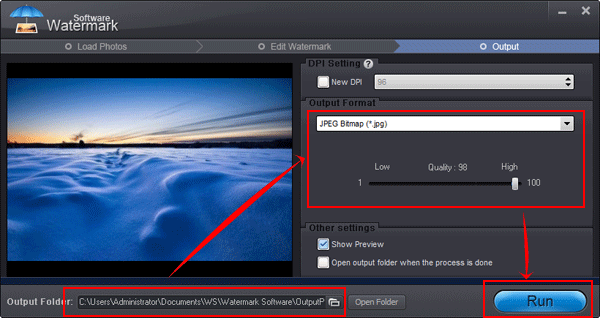
1) Select output folder
2) Set output image format and set quality. There a most popular image formats.
3) Start output process, the speed of process so fast, put watermark on 100 photos less than 1 minute.
Tips: after process done, the software will popping up output folder.
Still have trouble on watermarking photo? Please feel free to Contact Us
Watermark Software (photo edition) : This watermark tool provides professional image protecting solution for your online photos. The exclusive image processing technology lets you able to watermarking 500 photos within 1 minute.
Batch watermark - photos to save your time
How could you add captions to photos effectively
How to put text on photo - prevent your photo from unauthorized republish the effective way is put text on phot
Watermark your photos - to protect your photo's copyright
How to rename photos - in batch for better organization
Watermark is a recognizable image or pattern in paper that appears as various shades of lightness/darkness when viewed by transmitted light (or when viewed by reflected light, atop a dark background).