
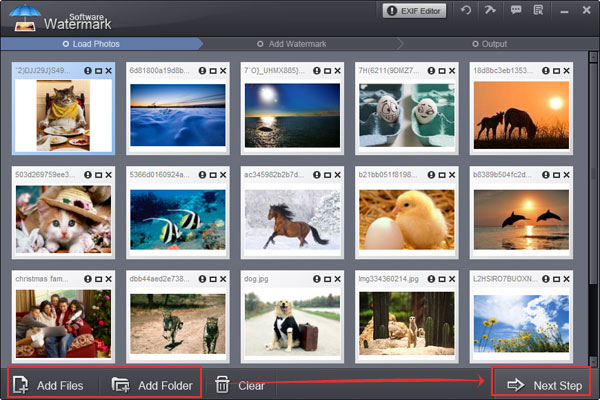
Step1. Click "Next" to editing interface.
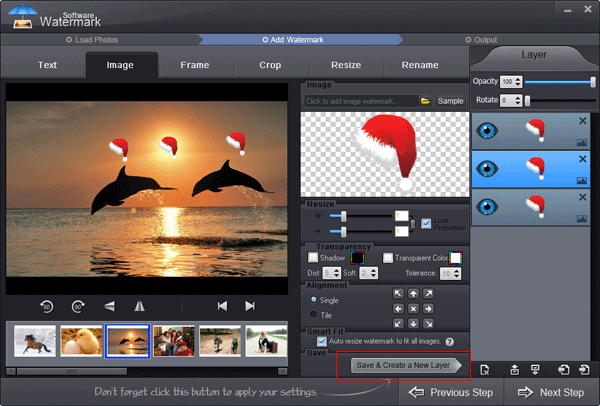
Step2. Please note the layer area on the right, when you add first text watermark and image watermark, two layers will be displayed on that area, a text watermark layer and an image watermark layer.
Step3. When you add anthor text or image watermark, you can click corresponding layer to edit it for your need.
Step4. If you want to discard a layer, just click correlative "Eye" icon to close it, the layer will not be displayed on your output images.
Previous: How to add image watermark?
Next: How to add frame to photo?



Watermark Software Tips
Use picture watermark to protect picture
Use text watermark protect your photo
A great watermark creator, create watermark to your photos
Choose a proper watermarking software
Create watermark to photos protect copyright is very popular
Protect image copyright when you upload photo on internet
Choose a photo watermark software for picture protection
Use photo watermark protect photos
Watermark image to protect your photo copyright
Add Watermark Graphics to Photos
Add image watermark for your photo
Watermark picture with image, text and logo
Batch watermark photos to save your time
The digital watermarking also as simply watermarking
Convert video to GIF image format
Watermark your photos to protect your photo's copyright
How to Add Text to GIF in an Easier Way
Discourage theft images add copyright watermark in images
We add watermark means put watermark info into photos
A lot of people are learning how to watermark photos
Make photo web more attractive by insert watermark to them
Do you want to make watermark for your photos
Image protection becomes more and more important
Other Tips