The internet is a magical place, provided platform to us for intercommunion and learning. Here we can showcase our artistic talent, technology, thinking and our self... More and more people would like to show their photos to everybody, share their joy with everyone. But, how do you know that your photos are secure? If you are sharing your photos on internet, you are at the risk of losing them. Someone could take the photos for their own using, or malicious revised, you might never even know. So put words on photo before upload to the internet is requisite, this is best effective way to protect your photo.

Part 1. Free Put Words on Photo - the Tool You Need
Part 2. How to Put Words on Photo Free
Part 3. How to Put Words on Photo with Watermark Software
Attendant problem is that how to put words on photo, I think many common users do not know how to do it. Here I want to say, although most people do not know how to put words on photo, and have no enough time to learn some professional photo tools like photoshop. Do not worry, I will recommend the easy to use software to you - Watermark Softare. It able to put words on photos within 3 steps, this tool original price is $29.90, now you can get it free for personal use. (For Windows only)
Watermark Software is top 1 watermarking software (for photo) on Google search, it's real simple and fast watermarking program, also support familiar photo editing function such as photo resize, crop photo, photo frame etc.
Firstly, please download Watermark Software at: http://www.watermark-software.com/products/watermark-software/watermark-software.exe
After download, please install it to your computer, it support Windows 8, Windows 7, Windows 2008, Windows Vista, Windows 2003, Windows XP, Windows 2000, etc.
Run the software, click "Buy Now" button to open registration interface.
Tips: this is shareware original price is $29.90, but you can get it free within this week, if you want to get a free license key, just send email to support@watermark-software.com.
By the way, do not miss this opportunity!!! You can not find free watermark software like this, actually you can not find any free watermark software.
If you have no the installer of Watermark Software, download it:

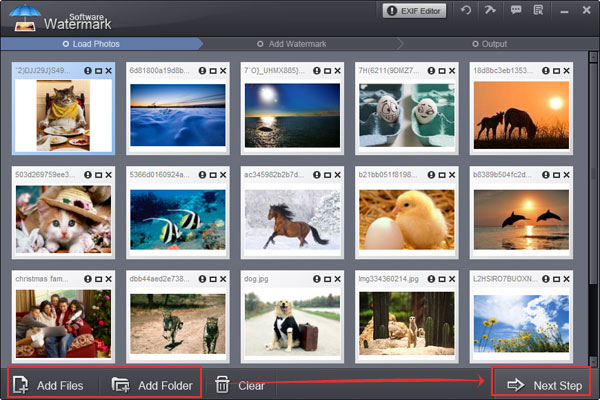
Step 1, Load your photos to list and go to next step.
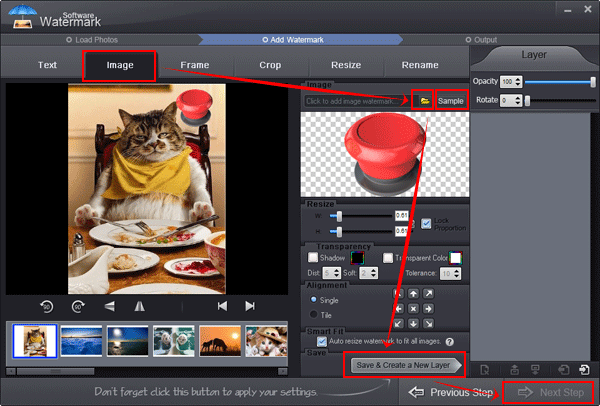
Step 2, Photo watermark setting
1) Click the tag to image watermark setting interface.
2) Load your watermark by clicking yellow "Folder" button
3) You can also select our free watermarks (over 100 watermarks)
4) Save and create a watermark layer. You can save current project for next using.
5) Click "Next Step" button
Step 3, Output process.
1) Select output folder.
2) Set output image format and set quality.
3) Start output process, the speed of process so fast, put watermark on 100 photos less than 1 minute.
Tips: after process done, the software will popping up output folder.
Still have trouble? Please Contact Us >>
Watermark Software (photo edition) : This watermark tool provides professional image protecting solution for your online photos. The exclusive image processing technology lets you able to watermarking 500 photos within 1 minute.
How to put text on photo - prevent your photo from unauthorized republish the effective way
Add text to picture - to watermarking your pictures
How to add text to GIF - in an easier way
How to add signature to picture - actually there are mainly two types of adding signature to picture thats text watermark and...
How could you put logo on pictures at once
How to rename photos in batch for better organization
Watermark your photos - to protect your photo's copyright
How could you add captions to photos effectively
Watermark on Wikipedia